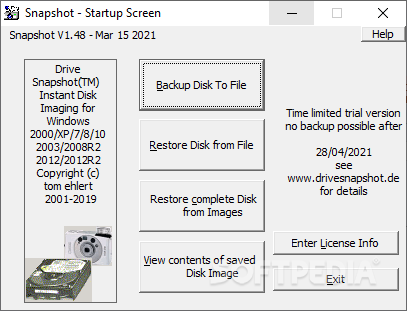
Drive SnapShot bütün sürücüyü yedeklemek için kullanılabilir. Bu programı ilk defa çalıştırdığınızda takvim günün kontrol eder. programını çalıştırmak için "Go, Programs, Drive ShapShot" menü seçeneğini kullanabilirsiniz. Daha sonra "Backup Disk to File" seçeneğini seçin. Böylece sürücünüzde bulunan bütün içeriği bir dosya halinde başka bir sürücüye kopyalayabilirsiniz. Yukarıdaki pencereden hangi sürücüyü yedeklemek istiyorsanız onu seçin ve "Next" tuşuna basın. Yeni gelen pencereden disk görüntüsü dosyanızı nereye kaydedeceğinizi seçin, örneğin harici bir USB sabit disk olabilir. Dosya adını yazın daha sonra "Browse" tuşuna basın ve görüntü (image) dosyasının nereye yazılacağını seçin.
"Advanced Options" tuşuna basın. "Maximum image single file size" alanında görüntü dosyanızın en fazla ne kadar büyük olması gerektiğine karar verebilirsiniz. Örneğin, eğer boyut olarak 700 MB seçerseniz, görüntüyü birden çok CD'ye yazabilirsiniz.
"Start Copy" tuşuna basarak yedekleme işlemini başlatabilirsiniz. Tamamlanmış olan görüntü dosyasını deneyin: sanal bir disk sürücü gibi görünen ve bir sürücü harfine sahip olan bir görüntü dosyanızın olması gerekiyor. Sonra ana menüde bulunan "View contents of saved Disk Image" tuşuna tıklayın ve bir sürücü adı seçin. Total Commander programını açın ve "Map and Explore Virtual Drive" seçeneğini kullanın.
Tam bir yedekleme işlemi, Nero ile bir CD'ye veya DVD'ye aktarabileceğiniz, bir veya daha fazla SNA dosyası oluşturabilir. Sisteminiz çöktüğünde "Restore Disk from File" seçeneğini kullanarak diskinizi yedek aldığınız tarihe geri döndürebilirsiniz.
Detaylı bilgi
Drive SnapShot 1.39 | 1.79 MB
Disk Image Backup/Restore for Windows NT/2000/XP/2003/PE/x64/Vista
Create Disk Image Backups, While Running Windows. The Backup process will back up all your data into a single file, containing all data, including system data and registry, for total security, should your computer ever crash. There is no restart (to DOS) necessary. Ever.
Continue your work, while the Backup is in progress
The new Snapshot technology ensures that all data are consistent, and reflect the PC's data at the start of backup. There are no difficulties with opened files. Ever.
This enables a very fast and easy way to back up servers and other computers, that must run 24 hours a day.
Easy Use and Restore of single Files or directories
Drive Snapshot creates a virtual drive, containing all your drive's data. You may use, compare, or restore these files directly from the Disk Image file.
This works with any program of your choice, including (of course) the Windows Explorer
Complete Restore of a disk in case of Disaster
If a disk is restored to its original state, it will be exactly the same as at the time of Backup - byte for byte.
Restoring a system partition will require DOS; other drives can be restored using Windows
Compatible with all Windows file systems (FAT16, FAT32, NTFS)
Supports Linux EXT2/3/Reiser
Compatible with all Windows RAID Methods Very easy and comprehensive command line interface
This makes automation of regular tasks a breeze.
=========
System requirements:
Windows NT 4.0 Service pack 3, Windows 2000, Windows XP, Windows 2003 Server, Windows PE, Vista
2 MB disk space + space to save the disk images.
8MB RAM if active, 0 MB if not active.
You need administrative rights to execute Drive Snapshot
Download
Click to Download from DepositFiles
Mirror
Other countries download it from Easy-Share.